Android devices offer a high level of customization, and Activity Launcher takes this flexibility to the next level. This app allows users to access hidden activities, settings, and features that are not normally visible in the default interface. Whether you’re a power user or just someone who enjoys tweaking their device, Activity Launcher provides a deeper level of control over your Android experience.

Activity Launcher
Adam Szalkowski
Download
2.25 MB
Activity Launcher Screenshots
1 / 4
2.25 MB
Size
2.1.6
Version
6.0+
Android
Universal
Arch
About Activity Launcher
Android devices offer a high level of customization, and Activity Launcher takes this flexibility to the next level. This app allows users to access hidden activities, settings, and features that are not normally visible in the default interface. Whether you’re a power user or just someone who enjoys tweaking their device, Activity Launcher provides a deeper level of control over your Android experience.
What Does Activity Launcher Do?
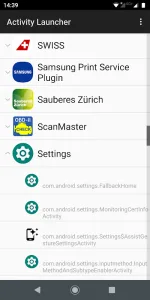
Activity Launcher scans your device for all available activities—small tasks or functions within apps—and displays them in an organized list. Many apps have hidden activities that developers use for testing or advanced settings, and this tool makes them accessible. For example, you can launch specific settings screens in system apps or bypass the main interface of an application to go directly to a particular function.
Key Features of Activity Launcher
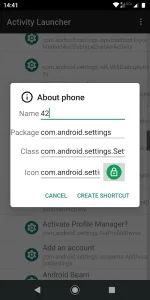
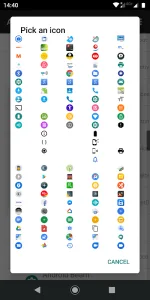
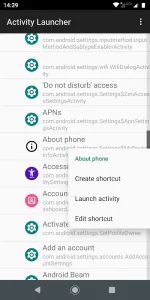
One of the standout features of Activity Launcher is its ability to create shortcuts for these hidden activities. Once you find a useful activity, you can save it as a home screen shortcut for quick access. This is particularly helpful for frequently used settings or tools buried deep within menus. Additionally, the app categorizes activities by the apps they belong to, making navigation simple and efficient.
Who Should Use Activity Launcher?
While Activity Launcher is incredibly useful, it’s best suited for advanced users who understand Android’s structure. Novice users might find some activities confusing or unnecessary. However, for developers, tech enthusiasts, or anyone looking to unlock hidden functionalities, this app is a must-have. It’s also great for troubleshooting, as it allows direct access to diagnostic tools and logs.
Is Activity Launcher Safe to Use?
Activity Launcher itself is safe, but users should be cautious when accessing hidden activities. Some functions may alter system settings or cause instability if misused. It’s always a good idea to research an activity before launching it, especially if it relates to system configurations. The app requires no special permissions, ensuring user privacy remains intact.
Frequently Asked Questions
Some activities may not work as expected or could cause apps to behave unpredictably. It’s best to stick to activities you recognize or have researched.
Yes, as long as your device runs Android, Activity Launcher should work. However, some manufacturer-specific activities may not be available on all devices.
No, the app works without root, though some deeper system activities may only be accessible on rooted devices.
Additional APP Information
Package Name
de.szalkowski.activitylauncher
Developer
Adam Szalkowski
Category
Updated
Dec 8, 2025
Content Rating
Everyone
Signature
e16b44a1ac8f3fbfc8f6d8b62d12ffa5b076cf7b
Get it On

You are now ready to download Activity Launcher for free. Here are some notes:
- Please read our APK Info and installation instructions carefully for the game & app to work properly
- Read the FAQ carefully for more details
4.2/5 (17 votes)